GL.iNet Comet Q (GL-RMQ1) Pocket KVM, Plug & Play Remote for Laptop iPhone



GL.iNet Comet Q (GL-RMQ1) Pocket KVM: A Compact Remote Access Tool for Everyday IT Help
Remote support usually means asking someone to install software, share a screen, and hope the connection holds. The GL.iNet Comet Q (GL-RMQ1) takes a different route. It is a pocket-sized KVM device that connects to a target machine through a single foldable USB-C cable and lets you control that machine from a browser or a mobile app. The idea is to provide hardware-level access without installing anything on the device being helped, which makes it an interesting option for people who regularly assist family members or manage machines across different locations.
This review walks through what the Comet Q is, how its features fit together, and where its design makes the most sense. Everything below is based on the manufacturer’s stated specifications and described functionality.
Design and Build Approach
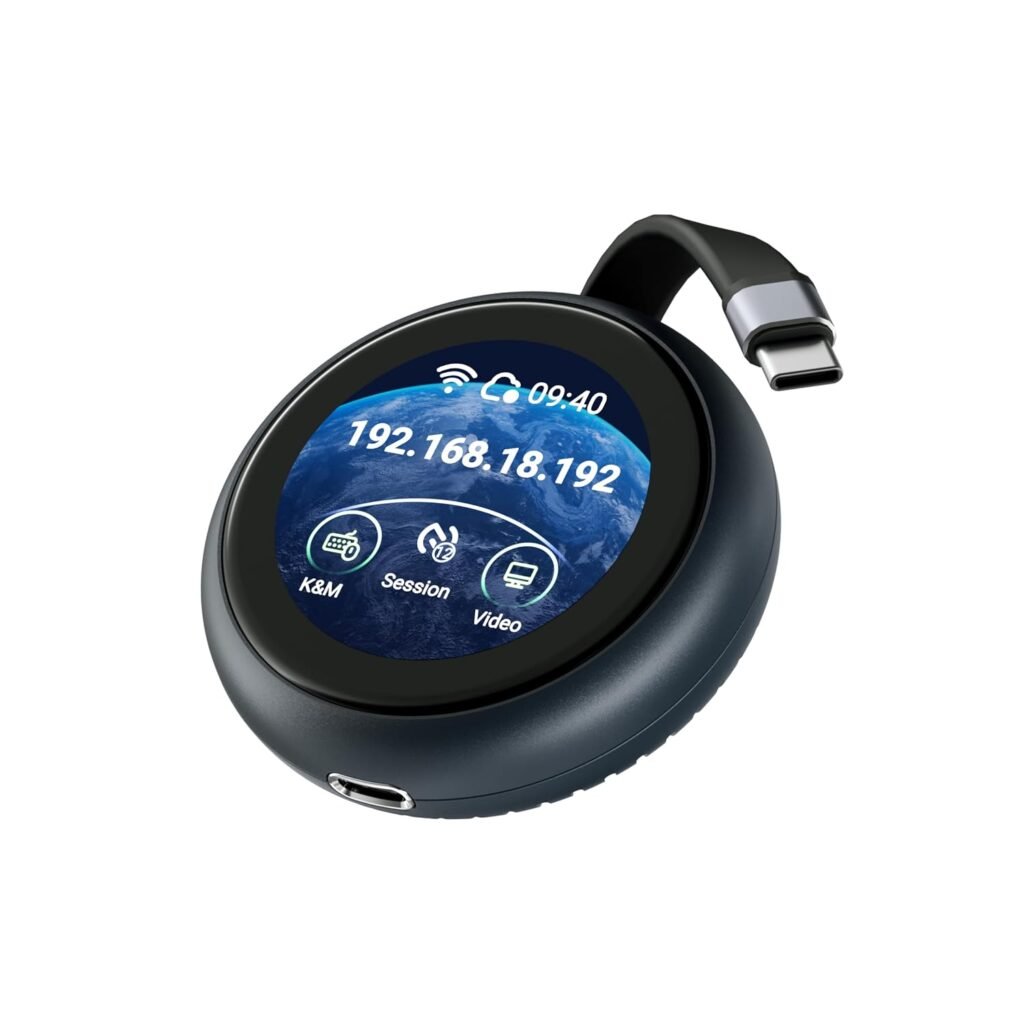
The Comet Q is built around portability. Its dimensions are listed at 70 x 70 x 22 mm, which puts it in a genuinely pocketable category. That small footprint is reinforced by the foldable USB-C cable, which is integrated into the device rather than carried separately. For a tool meant to travel between homes, offices, and family members’ houses, having the cable attached removes a common point of failure and simplifies setup.
On the device itself, a 1.8-inch touchscreen handles local interaction. According to the product information, this screen is used for viewing device and network status, switching networks, and triggering common actions directly on the unit. That means basic checks and changes do not require opening a browser session first. There is also a hidden reset button that restores the device to its default settings, a practical inclusion for a piece of hardware that may be reconfigured across different networks.
Internally, the Comet Q runs on a dual-core ARM system with 512 MB of LPDDR4 memory and 512 MB of NAND storage, operating on Buildroot. These are modest, purpose-built specifications rather than high-performance computing hardware, which fits a device whose job is to manage a remote session rather than run applications locally.
Features and Technology
The central feature is the all-in-one USB-C connection. The foldable cable carries video, audio, keyboard, and mouse data through a single link. When plugged into a compatible device that supports DP Alt Mode, the Comet Q provides hardware-level control without needing separate video or input cables. This is the detail that separates it from software-based remote tools: the target machine does not need a remote client installed.
Video is streamed at up to 2560 x 1440 at 60 FPS through USB-C DP Alt Mode. The manufacturer describes this as suitable for detailed diagnostics and smooth remote operation, while noting that actual image quality and responsiveness vary with network bandwidth. That caveat is worth taking seriously, since a 2K QHD stream depends on a solid connection between the Comet Q and the viewer.
Networking is handled by Wi-Fi 6, with link rates up to 286 Mbps on both 2.4 GHz and 5 GHz bands. The device also supports preset profiles, which let it move between home, office, and family networks without repeating setup each time. For anyone who carries a support device between locations, that profile system is likely to be one of the more convenient aspects of the design.
Remote Access and Security
The Comet Q is positioned around family IT support, and one of its more distinctive features is remote wake-up. According to the product information, it can wake supported devices that are asleep, locked, or logged out, then resume the session in a browser. This addresses a common frustration in remote help: reaching a machine that is not actively in use. The device is also described as lighting up screens only during authorised sessions, which is presented as a privacy measure.
Access can be arranged through Tailscale and ZeroTier without port forwarding, and two-factor authentication protects access. These are stated capabilities rather than independently verified security guarantees, but they point to a design that treats remote access as something to be controlled rather than left open. The physical disconnect is equally relevant: unplugging the USB-C cable is described as ending control with no background process, residual access, or target app left behind. That gives the person providing support a simple, tangible way to close a session.
Control Options and Compatibility
Control is deliberately flexible. On a computer, a browser is enough. On a phone or tablet, the touch-optimised GLKVM App is available for cross-platform control. Neither approach requires remote software on the target device, which keeps the setup on the helper’s side rather than the helped person’s side.
Device support is listed as iPhone 15 onward, iPad Pro, Mac mini, MacBook, and Windows PCs. Compatibility depends on the target supporting DP Alt Mode over USB-C, so it is worth confirming that detail before relying on the Comet Q with a particular machine. The listed range covers a broad set of modern devices, but it is not described as universal.
Performance and Everyday Experience
In practical terms, the Comet Q is designed to reduce the friction of remote support. The single-cable connection means less to plug in and fewer things to explain to the person on the other end. The touchscreen provides quick status checks without opening a session, and the preset network profiles mean the device can be moved between locations without a fresh configuration each time.
The streaming specification of up to 2560 x 1440 at 60 FPS suggests the device is intended for work that benefits from a clear view of the target screen, such as diagnostics or navigating settings. The manufacturer’s own note that quality and responsiveness vary with network bandwidth is an important qualifier: the Comet Q’s output is only as good as the connection carrying it. Wi-Fi 6 support is stated to help maintain stable sessions, but real-world results will depend on the network environment.
Who Is This Product Best For?
Based on the stated features, the Comet Q suits people who regularly provide technical help to family members or others at a distance. The remote wake-up function and the no-install approach on the target device are particularly relevant when the person being helped is not comfortable installing software or troubleshooting a connection.
It is also a reasonable fit for users who move between several locations, thanks to the compact size, integrated cable, and preset network profiles. Those who need to reach Macs, Windows PCs, iPads, or newer iPhones with DP Alt Mode support will find the listed compatibility relevant, provided their specific devices meet that requirement.
Final Verdict
The GL.iNet Comet Q is a focused piece of hardware built around a clear idea: remote control without installing anything on the target machine. Its strengths lie in the integrated USB-C design, the browser and app control options, the remote wake-up capability, and the physical disconnect that ends a session. The 1.8-inch touchscreen and preset network profiles add convenience for a device that is likely to travel.
Its limitations are equally clear from the supplied information. Compatibility depends on DP Alt Mode, the listed device range is specific rather than universal, and stream quality is explicitly tied to network bandwidth. For users whose needs match those conditions, the Comet Q offers a compact, self-contained approach to helping others with their devices.
Disclosure: As an Amazon Associate I earn from qualifying purchases. If you buy through links on this page, we may earn a commission at no extra cost to you.
View on Amazon